 RepolveGet the app
How we compared these workout tracking apps
We compared logging tools, beginner usefulness, progress information, programming, social functionality, platform support, and free-versus-paid access.
For a beginner who already has a training plan, repeatable logging and understandable history carry the most weight. For someone who needs a plan, programming becomes more important; Boostcamp, Fitbod, or Alpha Progression may therefore be a better fit.
These recommendations describe documented product fit. We did not measure logging speed, test subscription purchases, or run a training study. Ease-of-use judgments are provisional rather than measured results.
We group recommendations by use case rather than assigning an overall winner. A strong logging workflow, a ready-made program, and a broader view of strength solve different problems.
Workout logging vs. gym progress tracking
A workout log records what happened: exercises, sets, repetitions, load, and dates. That record is valuable by itself. It tells you what to repeat, what you completed, and what changed.
Progress tracking organizes that information around a question. Consider this hypothetical bench-press log:
- Week one60 kg × 8 reps
- Week six60 kg × 10 reps
- Week twelve65 kg × 8 reps
Illustrative training entries, not a customer result.
A history screen preserves those performances. A chart makes the pattern easier to see. An estimated one-repetition maximum offers another way to compare sets with different repetition counts.
But “analytics” can describe different things:
- Exercise performance
- How is this particular lift changing?
- Training exposure
- How much work am I logging for different muscles?
- Estimated strength
- What do eligible performances suggest about my capabilities?
A muscle diagram colored by set count answers a different question from a muscle-strength estimate. Neither should be interpreted without knowing what the underlying number means.
Doubling three sets to six at the same weight and repetitions doubles logged volume. It does not establish that maximum strength doubled. A new exercise or different machine can also make comparisons less straightforward.
A useful app makes these distinctions understandable while keeping the original training evidence accessible.
Hevy: Best for social workout logging
Hevy combines workout logging, reusable routines, exercise charts, and a social feed. You can follow other lifters, react to workouts, and save routines shared by others. Its documented support for phones, browsers, Apple Watch, and Wear OS gives it broad practical appeal. Explore Hevy’s features.
For a beginner, that combination offers somewhere to record a familiar routine and review how individual lifts change. The social element is useful if seeing friends train helps you keep showing up.
Hevy’s free tier allows four routines and seven custom exercises; longer-range statistics and additional tools require Pro. Current documentation also includes Hevy Trainer, with personalized programming and progression recommendations. Describing the entire product as a passive log would be inaccurate. Hevy’s current feature guide.
Best fit: A beginner wanting a flexible tracker, particularly when friends already use it. Check the paid feature boundaries if long-term charts or guided programming are central to your choice.
Strong: Best digital gym notebook
Strong is a good fit when you know your workout and want to record it consistently. Its tools include exercise history, rest timers, supersets, custom exercises, and data export. Strong Pro adds more extensive progress visualization. Explore Strong’s features.
The appeal is a focused workflow: open a template, record what happened, and return to the same exercises next time. Someone following a coach’s plan may value that more than having the app recommend a different session.
Strong’s free version allows three saved workout templates. Unlimited templates require Pro. Three templates can accommodate a repeating routine, but someone maintaining many different sessions may need the upgrade. Strong’s template limits.
Best fit: Lifters replacing a notebook or spreadsheet while retaining control of their own programming. If your main problem is deciding what to train, a program-led app is the more direct solution.
Boostcamp: Best for established programs
Boostcamp combines a workout tracker with a library of coach-designed and community programs. Instead of translating a program from an article or spreadsheet into another app, you can follow its sessions and record your results in one place. Explore Boostcamp.
That makes it especially relevant to beginners who need structure. The important selection criteria are the program’s experience level, schedule, equipment requirements, and instructions—not simply how popular its author is.
Boostcamp also offers more than program delivery. Its documentation describes a 0–100 Strength Score across squat, deadlift, horizontal press, vertical press, and pull, adjusted for bodyweight using DOTS. Its separate Muscle Tracker displays per-muscle training volume, not a muscle-strength estimate. Pro adds personalized programs, automatic progression, additional score views, and exclusive programs. Much of the library is free, but every program and tool is not. Compare Boostcamp Free and Pro.
Best fit: Someone who wants to follow a defined training block. The tradeoff is choosing an appropriate program from a large collection; access to many plans does not automatically identify the right one.
Fitbod: Best for automated workouts
Fitbod is designed around recommending what to do next. Its documentation describes using goals, experience, equipment, training preferences, and workout history to generate sessions. You can adjust the recommendations rather than accepting every exercise unchanged. How Fitbod works.
That is a useful distinction for someone who wants to open an app and receive a session suited to the available setup.
Fitbod also deserves consideration for analytics. Its Muscle Strength (mStrength) metric uses best performances in exercises targeting a muscle group, previous scores, and progress patterns. Fitbod describes it as a relative measure of muscle-group development. Its Overall Strength Score averages the muscle scores once coverage requirements are met; its separate Estimated Strength metric concerns exercise-level capacity. Fitbod’s metrics explained.
The main purchasing tradeoff is ongoing subscription cost. Fitbod advertises website pricing of $15.99 monthly or $95.99 annually; check trial and regional terms before purchase. Fitbod subscription information.
Best fit: Someone who values workout recommendations enough to pay for them. Someone already committed to a specific coach-written program may have less need for this emphasis.
Alpha Progression: Best for progression guidance
Alpha Progression connects workout logging with detailed recommendations about weight and repetitions. Pro can generate a plan and provide working-set targets informed by previous workouts, the current session, and available weight increments. Explore Alpha Progression.
This is particularly relevant when your question is more specific than “What workout should I do?” You may already have exercises selected and want guidance on how to progress them.
The free version supports unlimited logging and manually created plans. Plan generation, progression recommendations, detailed charts, and advanced tools require Pro. Its toolkit also includes periodization, deloads, and repetitions-in-reserve features. Alpha Progression feature and pricing guide.
Best fit: Someone who wants structured progression for muscle-building training. Its most distinctive guidance sits in the paid tier, and the extra planning controls may be unnecessary for someone seeking a basic log.
Repolve: Best for understanding strength and progress
Repolve turns eligible workout data into a broader understanding of strength and progress. Alongside logging sets, reps, and weights, it builds a Strength Profile that connects exercise performance, muscle-level estimates, and an overall Strength Score. The purpose is to help you understand what is changing across your training—not simply display your workout history.
Repolve’s public listing also documents importing workout history from Strong. For an existing Strong user, this creates a practical way to explore a different view of training without assuming their history begins with a new app. Repolve on the App Store.
Repolve’s appeal is the question it foregrounds: what does this collection of workouts suggest about strength across the body?
The original log remains the evidence: exercises, sets, repetitions, and weights. Eligible performances contribute to exercise-level estimates, which inform muscle-group estimates and the overall Strength Profile. Together with progress views, this gives you a way to explore how your recorded training relates to strength over time, rather than inspecting each lift in isolation.
For strength observations, Repolve uses the strongest eligible set for each exercise within a workout. More sets can mean more training exposure, but they do not automatically mean a higher maximum-strength estimate. That distinction keeps the question “How much work did I do?” separate from “What does this performance suggest I can do?”
Its limitations matter. Confirmed public availability here is iPhone, while the other five apps support Android. Personalized programming remains in development or testing. Choose an established programming product if you need that capability today.
Best fit: Lifters who want to understand how their strength is developing across exercises and muscle groups, and follow that development over time. Repolve brings that interpretation together with workout logging, history, PRs, and social training. Its estimates are specific to its scoring model; this comparison does not establish greater accuracy than competitors.
What makes Repolve’s Strength Profile different?
A Strength Profile is Repolve’s representation of a lifter’s estimated strength across the body, built from eligible training history and expressed through an overall Strength Score and muscle-group estimates.
According to Repolve’s product specifications, its model covers 13 muscle groups. Scores depend on eligible exercise evidence; logging work for a muscle does not guarantee a scored estimate. The system uses estimated one-repetition maximum data from eligible strength sets, normalizing relevant performance using factors including bodyweight and sex. For relevant strength observations, it uses an exercise’s strongest eligible set within a workout rather than treating every set as a separate maximum-strength result.
The workout record
Bench press 155 lb × 8 reps
Saved in your exercise history
The foundation of workout tracking.
Repolve’s interpretation
- Workout dataBench press · 155 lb × 8 reps
- Eligible strength evidenceStrongest eligible set per exercise and workout
- Exercise-level estimateEstimated performance from the eligible set
- Muscle-level strengthEvidence contributes to supported muscle estimates
- Strength ProfileMuscle estimates and an overall Strength Score
- Progress over timeFollow changes as training evidence develops
Illustrative input, not a calculated result. Eligibility and scoring context matter. Other trackers also offer analytics; this diagram explains Repolve’s approach.
That creates a different view from browsing exercise histories one at a time. Repolve’s gym progress tracking brings muscle-level estimates and overall strength development into the same product as workout logging, PRs, and social activity. Read how Strength Profile works.
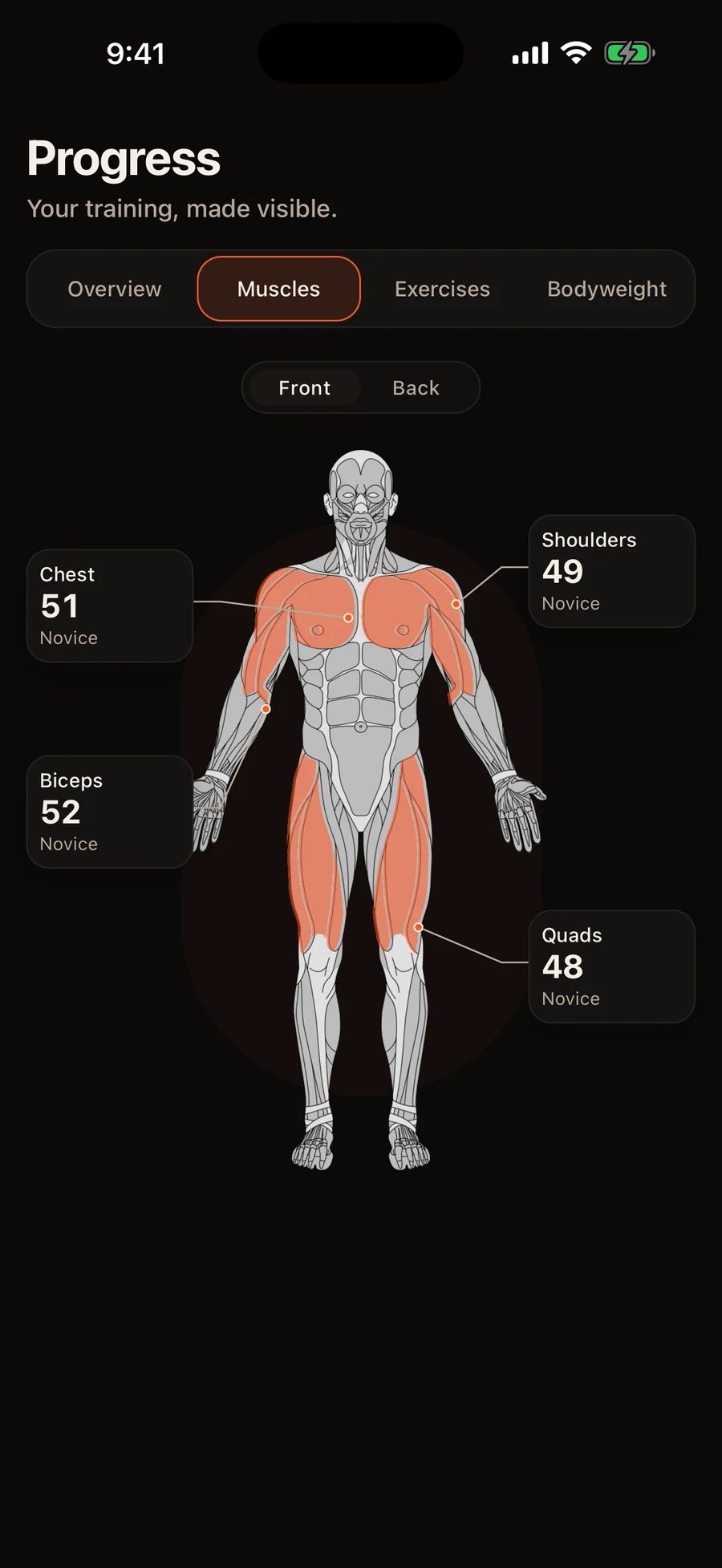
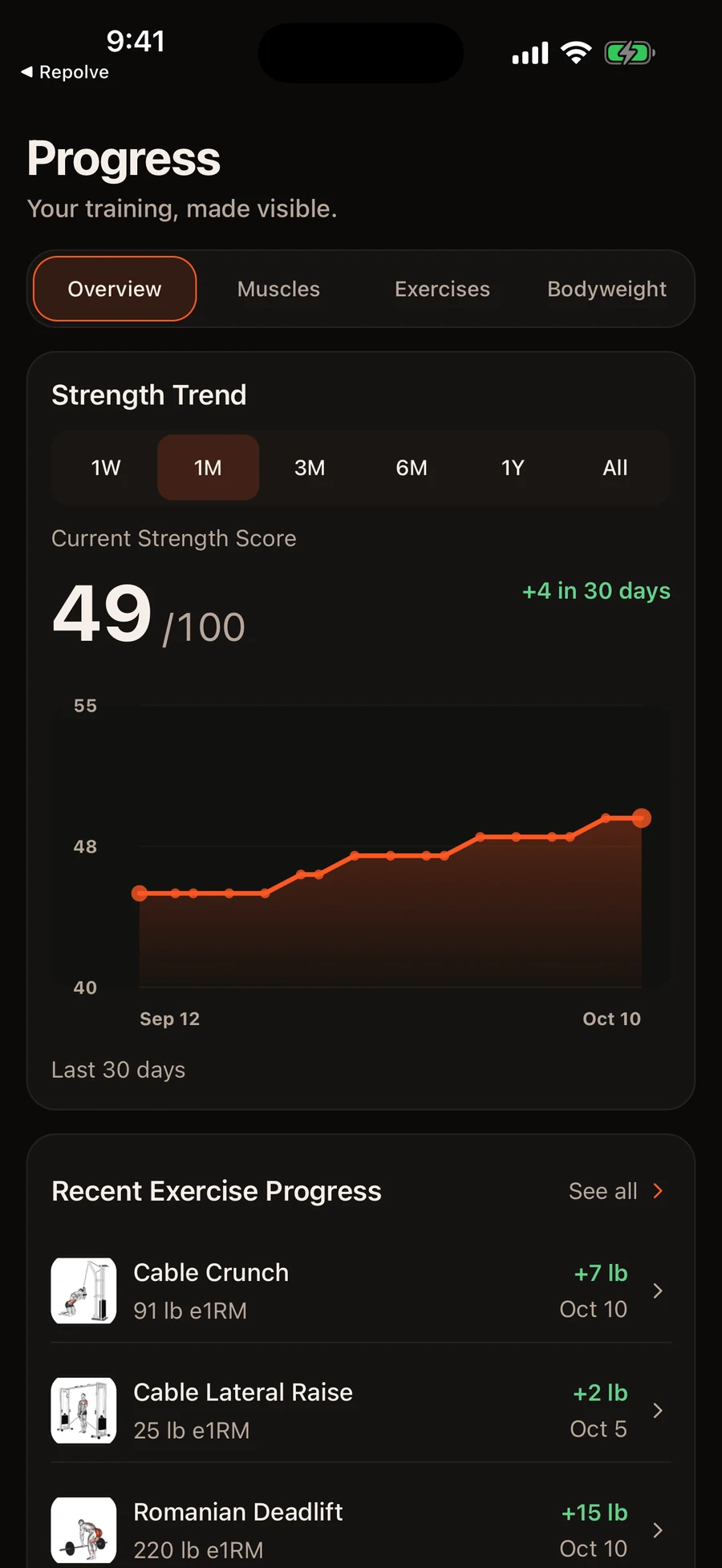
Actual app screens captured from the native preview. Fictional example data; not customer outcomes.
These are model-based estimates. A score summarizes eligible evidence; it does not directly measure muscle size or establish a universal ranking of physical ability. Sparse training data limits what can reasonably be inferred. Repolve’s strength standards belong to its own scoring system.
The distinction is not that competitors lack interpretation. Fitbod documents muscle and overall strength scores, while Boostcamp documents scoring across movement categories. Their scores should not be treated as interchangeable with Repolve’s.
Repolve’s longer-term direction is personalized strength training: understand the athlete, prescribe training, and increasingly adapt it. The personalized programming system being developed is explainable and rules-based, considering experience, training days, session duration, equipment, and muscle priorities. That development work should not be confused with generally available programming or a completed adaptation system.
Which workout tracking app should you choose?
- Choose Hevy if you want logging, exercise charts, and social motivation across a broad range of devices.
- Choose Strong if you have a plan and want a focused place to record it.
- Choose Boostcamp if following an established program is your main requirement.
- Choose Fitbod if you want the app to generate workout recommendations.
- Choose Alpha Progression if you want detailed load and repetition guidance within structured training.
- Choose Repolve if you want to turn workout history into an understanding of strength across your body and progress over time. Available on iPhone.
Before committing, enter one familiar workout. Check whether your exercises are easy to find, previous results are understandable, and the information you care about remains available at the price you intend to pay.
Frequently asked questions
What is the best workout tracking app for beginners?
The best fit depends on what you need help with. Hevy suits social logging, Strong suits a straightforward workout record, and Boostcamp suits following an established program. Repolve suits iPhone users who want to understand their training through a Strength Profile. Start with the question you want the app to answer.
What is the best app for tracking strength progress?
For individual lifts, Hevy and Strong offer useful history and charting tools. For broader strength estimates, consider Repolve’s Strength Profile and Fitbod’s muscle and overall strength scores. Boostcamp also provides strength scoring. Compare what each metric represents rather than assuming every score measures the same thing.
Is a workout tracking app better than a spreadsheet?
An app can reduce repeated entry and provide timers, exercise histories, and ready-made charts. A spreadsheet gives you control over fields, formulas, and layout. If your spreadsheet already answers your questions with little effort, switching is optional.
What should a strength-training app track?
At minimum: the exercise and variation, date, working-set repetitions, and load. Notes about equipment, technique, and effort can make later comparisons more meaningful. Clear history and consistent units matter more than collecting every possible metric.
What is the difference between a workout logger and a workout planner?
A logger records completed training. A planner specifies future training, such as exercises, sets, repetitions, and progression. Many apps combine both functions, but saved routine templates do not necessarily provide personalized programming.
Can workout tracking apps show which muscles are getting stronger?
Repolve estimates muscle-group strength from eligible training evidence. Fitbod describes mStrength as a relative muscle-group measure based on best exercise performances and progress patterns. Boostcamp’s Muscle Tracker shows volume, while its Strength Score summarizes movement categories. These metrics use different definitions; none directly measures a muscle’s strength in isolation.
Which workout tracking app is best for experienced lifters?
Strong or Hevy can suit lifters managing their own programming. Boostcamp suits those following defined programs, while Alpha Progression offers detailed progression tools. Repolve may appeal to experienced iPhone users interested in a broader Strength Profile. Choose according to the information and decisions you need help with.
Sources and editorial notes
Editorial responsibility: Repolve publishes and maintains this guide. We compare documented features and disclose our ownership of one of the products. We do not claim hands-on comparative testing, independent validation of strength estimates, or measured superiority. About Repolve · Report a correction.
Features and prices were checked against official product documentation and US App Store listings on October 17, 2026. Repolve’s technical description also uses first-party product specifications. Linked sources appear beside the relevant claims.
- Hevy: current features and paid access
- Strong: product features
- Boostcamp: plans, analytics, and pricing
- Fitbod: strength metrics and subscription terms
- Alpha Progression: feature and pricing fact sheet
- Repolve: public iPhone listing
This article is published by Repolve, one of the products compared. Recommendations are editorial judgments about use-case fit, not measured training outcomes. Product offers and availability can change.